
UNHCR - The UN Refugee Agency's Global Donations Platform

67+
Million USD Processed Using the Drupal Fundraising Platform
3000
Published Campaigns in Different Regions at Different Times
63%
Less Time to Build, Design, and Publish Campaigns
56+
Currencies accepted
10+
Languages
$0
Platform fees
UNHCR, the UN Refugee Agency, protects and assists people forced to flee their homes. Alongside its annual budget, it launches emergency appeals that can't be planned in advance. When a crisis hits, campaigns have to go live fast, in the right language and currency, in every market.
Our Approach
UNHCR needed one platform that could run online fundraising across many markets from a single admin. We built it on Vargive, our open-source fundraising platform, using Varbase, Drupal Commerce, and Layout Builder.
Simplified User Experience
UNHCR's fundraising teams work across many markets, but their data needed to live in one place. We built a central donations platform on Vargive that runs every market and region from a single admin.
Each market has its own users, languages, and currencies. Drupal's role-based permissions keep editors inside their own markets, where they run their own campaigns. Admins manage users and permissions with a full view of every region and campaign. Each UNHCR department also gets campaign and donation dashboards built around how it works.
One platform now serves 9 countries, 4 regions, 56 currencies, and 10 languages.
AI Powered Fundraising with Vargive
When a crisis hits, displaced people need aid quickly, so the appeals that fund that aid have to go live quickly too. UNHCR's departments needed to create, edit, and launch campaigns without waiting on developers. We built the campaign workflow on Drupal Commerce and Layout Builder to make that possible.
Setting up Campaigns Easily
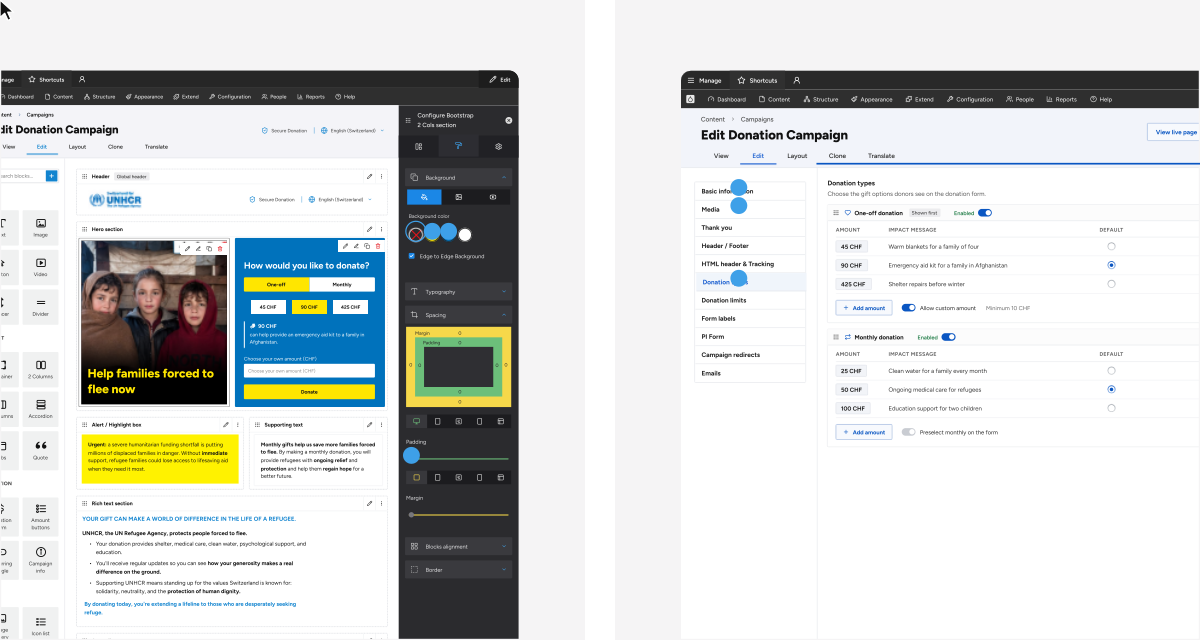
Every appeal is different, so editors set up each campaign on its own terms. They choose which form fields appear and which are required. They also set the donation type (one-off, monthly, or both), minimum amounts, currencies, an optional fee, and the media for each campaign.
Thank you messages come preset for each market's campaigns, and editors can override them at the market or campaign level.
Each campaign also carries a Salesforce campaign ID, which keeps campaign data in sync between the platform and UNHCR's Salesforce account.
Layouts, Templates, and Best Practices
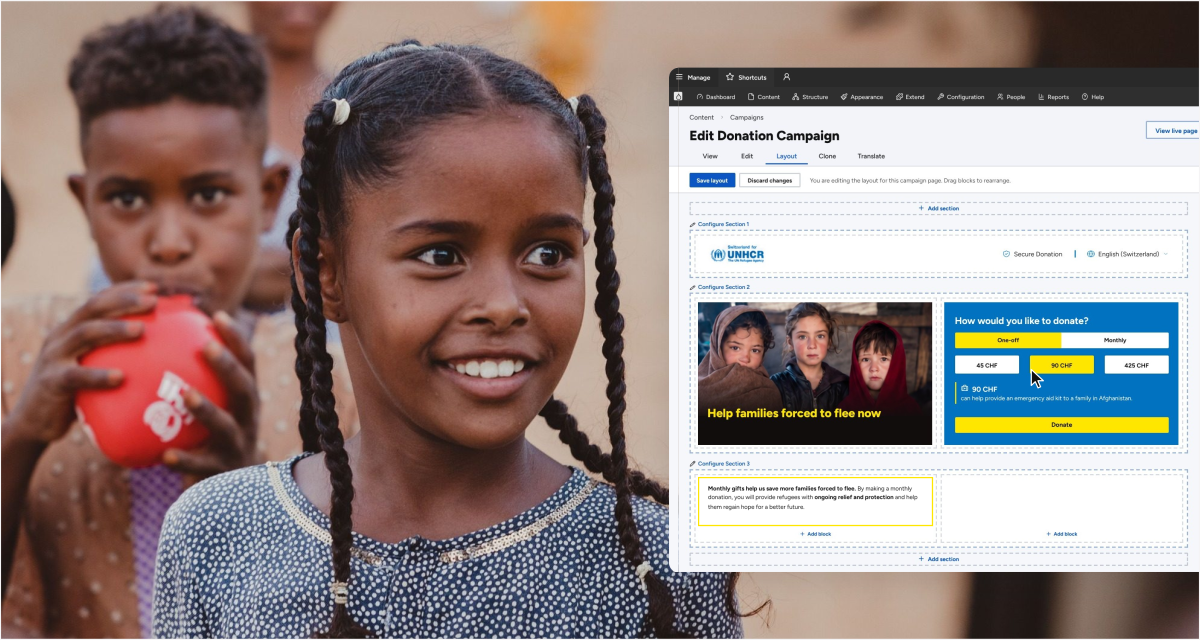
Once a campaign is set up, editors pick a page layout from predefined templates built for the team's most common appeals. When a campaign needs a different design, they adjust it in Varbase Layout Builder by rearranging sections, editing blocks, or adding new ones such as images, text, and custom HTML.
Any campaign can be cloned with its settings and design intact, so the next appeal starts from a finished page. No technical skills are needed, and the team builds, designs, and publishes evergreen and emergency campaigns in under 30 minutes.
Geotargeting and Redirects
Donors reach the platform from all over the world, and UNHCR defined dozens of geo-regions to serve them. The team needed to control which campaigns each region sees, and when.
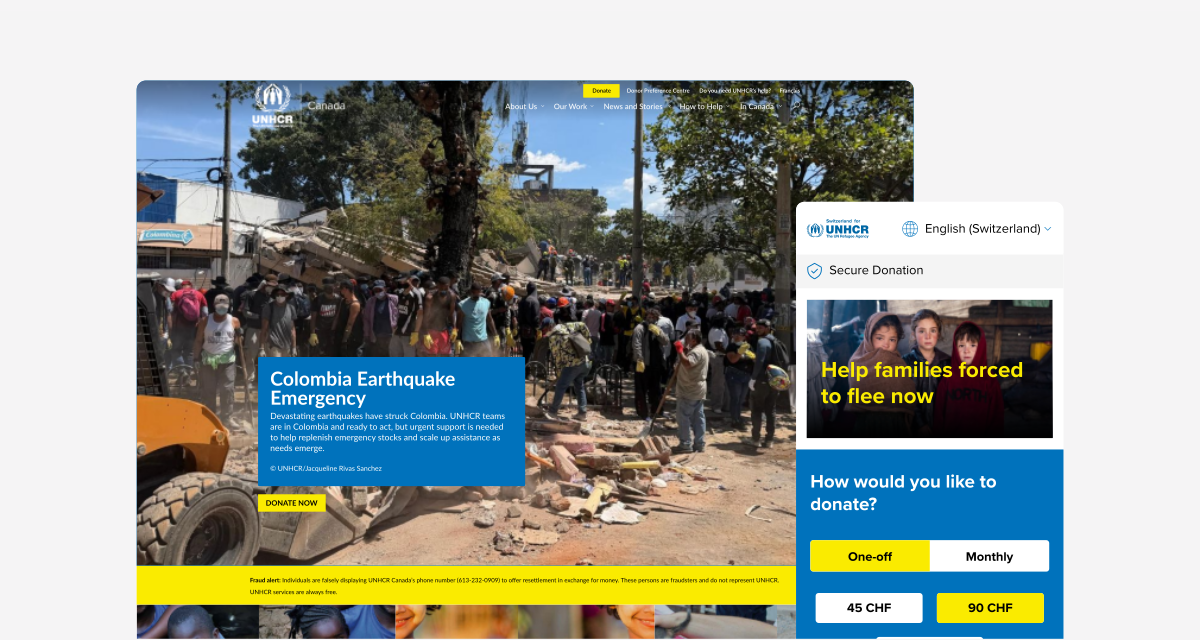
We customized the Drupal GeoIP module to detect each visitor's location by IP. The platform then shows the language, currency, and campaigns for that visitor's region. It either redirects them automatically or suggests the switch in a popup.
Admins can choose between two redirect types. A hard redirect sends visitors straight to the right market or campaign based on their IP. A soft redirect shows a customizable popup that suggests the relevant market and leaves the choice to the visitor.
Redirect Controls
Admins group countries into regions and decide where each region's visitors land. For every redirect, they choose the source region, the destination market, and the redirect type. A hard redirect sends visitors straight to that market. A soft redirect shows a popup, with a message the admin writes, that suggests the market and leaves the choice to the visitor.
The same controls work at the campaign level, so visitors from a region reach the campaign meant for them. Every active redirect sits in one dashboard, which lets the team change the campaign each region sees as appeals become more urgent.


From Appeal to Donation
When an emergency appeal is announced, an editor assigned to the affected country or region creates the campaign. They set the target countries, languages, and currencies, then choose the form fields and donation options.
Next, they pick a template, adjust it in Varbase Layout Builder, add images and copy, and publish. The whole process takes under 30 minutes.
Performance Tracking
UNHCR tracks every campaign in Google Analytics, which brings behavioral and real-time data into one dashboard. The team uses that data to test campaigns and page designs, fix what underperforms, and plan longer-term changes from trends over time. The aim is to get every donor to the right campaign without friction.
I'm highly satisfied with Vardot, during the project work, the final product, and post-launch support and follow up.


Final Results
UNHCR's markets now run their own campaigns on one shared platform, and headquarters keeps full visibility. Campaign publishing is 63% faster. More than 3,000 campaigns have been published, and more than $67 million has been processed.
Notable Features
Multi-Market Support
- Market expansion: configuration-driven process for setting up a new market for an application.
- Add a new market with minimal central administrative effort.
- Market offices should be able to set up their own form options, languages, pricing points etc.
- The majority of options of what is or isn't used should be easy to configure without needing a developer.
Donations and Campaign Pages
- Ability for the backend user to select whether to display various combinations of one-time or recurring
- Full flexibility and power of campaign configuration including capture forms, donation amounts, currencies, donation types
- Full flexibility and power of campaign appearance using intuitive easy to use drag-n-drop editor
- Predefined layouts for campaign
- Ability to override default campaign settings inherited from a market such as form fields, wording, pricing, thank you pages/emails, and metadata
Redirect Engine
- Ability to create and manage a list of URL redirects for each campaign/form
- Ability to manage a default, evergreen redirect list for all markets that can easily be added to any new page
- Allow markets to directly add their own URLs to default redirect list
- Allow markets to directly add their own URLs to specific page redirect list
Payment Gateways and Payment Processors
Integration with multiple Payment Gateways and Payment Processors and at a country or market level.
Multilingual and Multiregional
- Multiple languages per market
- IP-detection with redirects configuration
- Multi-currency support for each country/market
- Easy translation workflow
SEO
- SEO-optimised URL structure, clear and concise if visible to the customer
- Support for canonical tags if appropriate
- Structured data (schema.org) support
- XML Sitemap for campaign support with hreflang geotargeting suggestions
Integrations
- Google Tag Manager, Google Analytics, and Google Analytics Enhanced Ecommerce integration
- Salesforce's integration and potentially other CRMs